


How to Secure Shared Workspaces Without Friction

A shared workspace can change character several times in one day. Employees arrive before opening, members reserve meeting rooms, contractors access service areas, visitors check in for appointments, and cleaning teams enter after hours. Knowing how to secure shared workspaces means controlling those changing access needs without turning every door, credential, and visitor request into a manual task for facilities staff.
The right approach is not simply adding more locks or cameras. It is building a connected security model that verifies identity, applies access based on role and time, produces usable records, and can be managed centrally as the portfolio grows. For coworking operators, commercial property managers, and enterprises with flexible offices, that model protects people and assets while preserving the convenience that shared space is meant to deliver.

Start With the Reality of Shared-Space Risk
Shared workspaces have a larger and less predictable user population than a conventional single-tenant office. A single site may include permanent employees, rotating members, short-term tenants, delivery personnel, vendors, event attendees, and building operations teams. Each group needs a different level of access, often for a different period of time.
The most common weakness is not necessarily forced entry. It is excessive or outdated access. A former member still has an active badge. A contractor receives a master key because there is no practical way to limit access. A visitor follows an authorized person through a secured door. An office manager has to search through emails to confirm who approved an after-hours meeting.
Security planning should begin with a site-specific review of people, spaces, and operating hours. Identify public areas, member-only zones, tenant suites, IT closets, loading areas, records rooms, parking facilities, elevators, and emergency exits. Then decide which identity types require access to each zone, when that access is valid, and what evidence should be available if an incident occurs.
This process also exposes trade-offs. A small creative studio may prioritize a low-friction arrival experience and use simple mobile credentials. A healthcare-adjacent workspace or financial services tenant may require stronger identity verification, visitor screening, and detailed audit trails. The controls should reflect the risk of the area, not apply the same burden to every user and every door.
How to Secure Shared Workspaces With Zoned Access
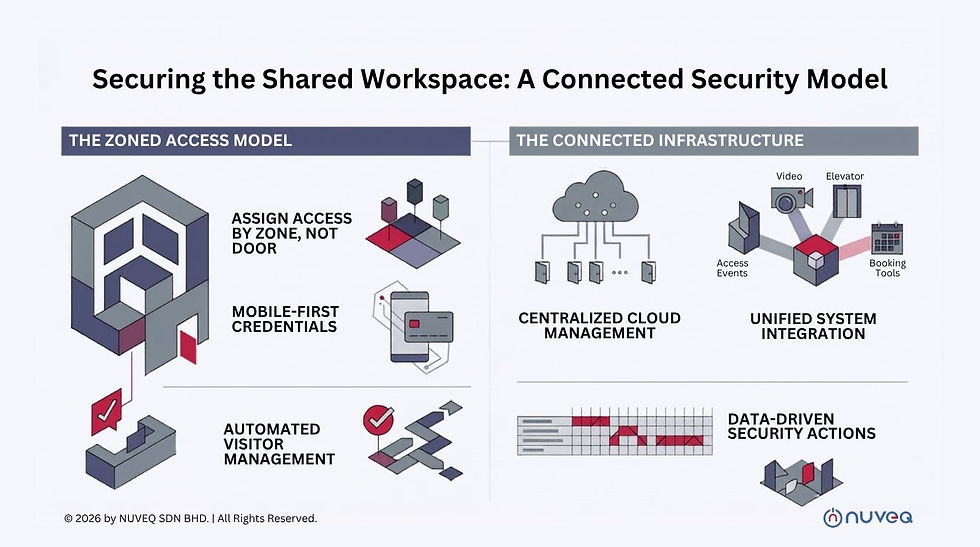
Effective access control starts with zones, not individual doors. Rather than assigning permissions one credential at a time, create clear access groups such as members, tenant administrators, facilities staff, cleaning crews, approved vendors, and visitors. Assign each group only the areas and schedules it needs.
For example, members may access the lobby, shared desks, kitchen, and booked meeting rooms during operating hours. A tenant employee may access their suite and designated parking area around the clock. Cleaning staff may enter only specified floors during a defined evening window. The principle is simple: access should be specific enough to reduce exposure but practical enough that teams do not create workarounds.
Cloud-native access control makes this model easier to maintain across multiple locations. A security or property management team can update schedules, revoke access, monitor door status, and review events from a centralized interface instead of traveling to each site or maintaining separate on-premise servers. This is particularly valuable for operators managing a network of flexible offices, satellite locations, or mixed-use properties.
Mobile credentials strengthen both security and convenience. They reduce the circulation of physical cards, support faster onboarding, and can be revoked immediately when a membership, contract, or employment relationship ends. Physical cards may still be appropriate for certain populations or facilities, but they should be managed within the same identity and access policy rather than treated as an exception outside the system.
Make Identity Verification Part of the Arrival Experience
A front desk is not a security strategy by itself. Reception teams can provide hospitality and visual oversight, but they cannot reliably manage high visitor volume with paper logs, phone calls, and handwritten badges. A digital visitor management process creates a more dependable entry point.
Visitors should be pre-registered where possible, linked to a host, and issued credentials that expire automatically after the visit. Depending on the facility and risk profile, the process can include ID verification, approval workflows, photo capture, watchlist checks, or nondisclosure acknowledgments. The goal is to confirm who is entering, why they are there, and who is responsible for their visit.
For busy shared workplaces, self-service check-in can reduce pressure on reception without reducing accountability. The system should notify hosts, maintain a real-time visitor list, and make it easy to identify who remains onsite during an emergency. For delivery drivers and other short-duration visitors, access can be restricted to a lobby, package room, or loading zone rather than granted to the full workspace.
Tailgating deserves particular attention. Open, collaborative environments can make it socially uncomfortable for employees to challenge someone following them through a door. At higher-risk entrances, combine policy with design: use turnstiles, optical lanes, monitored entry points, or video verification where appropriate. Security awareness training should also make clear that reporting an unfamiliar person is a normal operational responsibility, not an act of confrontation.
Connect Access Control to the Rest of the Building
A standalone door system delivers limited value when it cannot share context with visitor, video, elevator, parking, and building systems. Connected physical security provides a clearer operational picture.
When an access event and video record are connected, a security team can investigate a disputed entry without searching across separate platforms. When visitor credentials are linked to access rules, a guest can be limited automatically to the meeting room floor they are visiting. When elevator access is integrated, users can reach only authorized floors after entering the building. ANPR can extend the same approach to vehicle gates and parking areas.
Open API integrations matter because shared workspaces rarely operate with a single technology platform. Membership systems, HR directories, tenant portals, booking tools, incident management platforms, and identity providers may all need to exchange information with the security environment. Automation can create credentials when a member is approved, update permissions when a worker changes roles, and remove access when an account is terminated.
Integration should not mean connecting every available system without governance. Each integration introduces data flows and administrative dependencies. Evaluate what data is shared, who owns the integration, how failures are handled, and whether access changes are logged. The best architecture is connected, but also controlled.
Design for Exceptions, Outages, and Emergencies
Security systems are tested most seriously when normal operations break down. Shared workspaces need a documented response for lost phones, misplaced cards, terminated users, forced-door alerts, power disruptions, network interruptions, and emergency evacuation.
Remote administration helps teams respond quickly. A manager can deactivate a lost credential, issue a temporary replacement, or investigate a door alarm without being onsite. However, remote management should be protected with role-based administrative permissions, multifactor authentication, and a clear approval process for high-impact changes such as unlocking sensitive areas or altering enterprise-wide schedules.
Emergency procedures require balance. People must be able to exit safely, while security leaders need visibility into who may still be inside. Access records and visitor logs can support accountability, but they do not replace evacuation leadership, emergency communications, or local code compliance. Work with fire and life-safety requirements from the start, especially when adding turnstiles, gates, or controlled elevator access.
Turn Security Data Into Operational Action
The value of centralized security is not only the ability to open and close doors remotely. It is the ability to see patterns that reveal operational gaps. Repeated denied-entry events may indicate confusing schedules, poor onboarding, or an unauthorized attempt to access a restricted area. Doors propped open at the same time each day may point to a delivery workflow that needs redesign.
Review access and visitor reports on a consistent schedule. Look for inactive credentials, unusual after-hours activity, recurring tailgating concerns, failed visitor check-ins, and permissions that exceed a person's current role. These reviews should involve facilities, security, IT, and workplace operations when possible. Each team sees a different part of the risk.
NUVEQ supports this connected model through cloud-based access control and integrated physical security technologies that can be managed centrally across doors, sites, and identity types. For organizations replacing fragmented systems, the practical benefit is less manual administration and a more complete view of facility activity.
A secure shared workspace should feel organized rather than restrictive. When identity, access, visitor workflows, and building systems are designed around real operating patterns, people move through the workplace with confidence while the organization retains control where it matters most.


Comments