


Why a Centralized Facility Security Dashboard


When a security team is managing badges in one system, visitor logs in another, cameras on a separate platform, and incident alerts through email chains, the problem is not just inconvenience. It is delayed response, inconsistent oversight, and blind spots that grow with every new site. A centralized facility security dashboard solves that by giving operators, administrators, and decision-makers one place to monitor activity, control access, and act faster.
For organizations with multiple buildings, distributed teams, or a growing mix of security technologies, centralization is no longer a nice upgrade. It is the difference between reacting late and operating with real-time visibility. The stronger question is not whether a dashboard is useful. It is whether your current environment gives security and operations teams enough control to scale without adding complexity.
What a centralized facility security dashboard actually does
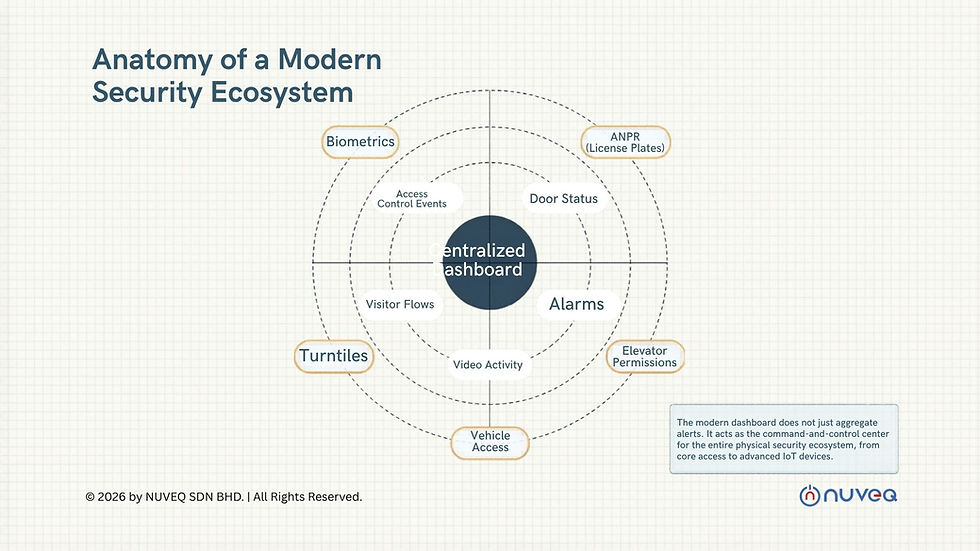
A centralized facility security dashboard brings together the operational layers of physical security into a single interface. That typically includes access control events, door status, alarm conditions, video activity, visitor flows, credential management, and site health. In a modern environment, it can also extend into biometrics, ANPR, elevator permissions, vehicle access, turnstiles, and IoT-based devices.
The practical value is simple. Instead of forcing teams to move between disconnected systems, the dashboard creates a live operating view across locations. A security director can see an access exception in one facility, compare it against video, confirm the user identity, and escalate if needed without logging into three different platforms. A facilities manager can identify a door forced open event and determine whether it is a maintenance issue, a user behavior issue, or a real threat.
That kind of visibility matters more as organizations expand. One office is manageable. Twenty sites across regions, each with its own hardware, access policies, and reporting habits, is where fragmentation starts to break operations.
Why fragmented systems create bigger risks than most teams expect

Most organizations do not set out to build a fragmented security stack. It usually happens over time. One site installs access control from one vendor. Another adds video from a different provider. A visitor system is purchased for the front desk. A gate controller gets added later. Soon, every upgrade solves one local problem while creating a larger management problem.
The issue is not just that the user experience becomes clumsy. Fragmented systems weaken consistency. Permissions are harder to audit. Incident timelines are harder to reconstruct. Credential changes can lag. Reporting becomes a manual exercise. During an emergency, operators may have the data they need, but not in a format or location that supports quick decisions.
This is where a centralized dashboard changes the operating model. It standardizes visibility, shortens the path from alert to action, and reduces the dependence on local workarounds. That improves security posture, but it also improves business efficiency. Teams spend less time stitching together information and more time managing risk.
The business case for a centralized facility security dashboard
For enterprise buyers, the value of a dashboard is not only technical. It is operational and financial. Centralization reduces the hidden costs that come from maintaining siloed tools and on-premise infrastructure. Fewer local servers mean fewer points of failure, less maintenance overhead, and less time spent on site-specific troubleshooting.
A cloud-based dashboard also supports remote administration at a level older systems struggle to match. Administrators can issue or revoke credentials, review live events, check system status, and update user permissions from anywhere. That matters for lean teams, after-hours incidents, and organizations where IT and security responsibility is shared across departments.
There is also a governance benefit. Executives and compliance stakeholders increasingly want clean reporting across multiple facilities. They want to know who accessed what, when exceptions occurred, how fast incidents were addressed, and whether policies are being enforced consistently. A centralized platform makes those answers easier to produce and defend.
What to look for in the dashboard itself
Not every dashboard delivers the same value. Some only aggregate alerts. Others provide true command-and-control capability. Buyers should look beyond the interface and focus on how the system performs in real operating conditions.
First, the dashboard should support unified management, not just unified viewing. If a team can see a problem but still needs separate software to resolve it, centralization is incomplete. The platform should allow operators to manage users, doors, schedules, mobile credentials, visitors, and device policies from the same environment.
Second, integration depth matters. A dashboard becomes more powerful when it connects access control, video surveillance, visitor management, identity verification, biometrics, and vehicle entry technologies in a coordinated way. Open API architecture is especially important for organizations that already have business systems they need to preserve, whether that includes HR, tenant management, directory services, or incident workflows.
Third, scalability should be proven, not promised. A system that works well for three buildings may perform very differently across hundreds of doors and geographically dispersed sites. Enterprise buyers should evaluate how the dashboard handles large user databases, concurrent events, role-based administration, and regional growth without forcing a redesign later.
Cloud architecture changes the equation
A centralized dashboard reaches its full value when it is built on cloud-native infrastructure. Traditional on-premise systems often create a bottleneck because every location depends on local servers, manual updates, and fragmented backup practices. That model increases maintenance load and can slow down change management.
Cloud-native security architecture supports faster deployment, remote updates, and more resilient system administration. It also makes it easier to standardize configurations across sites. Instead of treating each facility like a standalone environment, organizations can manage security as a connected ecosystem.
There are trade-offs, and buyers should evaluate them carefully. Cloud platforms depend on sound network planning, vendor reliability, and clear data governance. Some organizations with unique regulatory requirements may need hybrid deployment models or local failover strategies. But for most multi-site operations, the gains in visibility, manageability, and long-term scalability outweigh the limitations of older infrastructure.
Where dashboards create the most impact
The strongest use cases usually appear in environments where security events, user identities, and facility operations intersect every day. Commercial real estate teams need one view across lobbies, elevators, parking, tenant suites, and shared amenities. Healthcare facilities need tighter control over staff access, visitor movement, and restricted areas. Industrial sites need reliable perimeter management, gate control, and audit trails. Education, banking, data centers, and residential portfolios face similar demands, even if the workflows differ.
A centralized dashboard is especially valuable when the same organization manages different facility types under one operating structure. That is where standardization becomes strategic. Security policies can be applied consistently while still allowing local exceptions where they make sense.
This flexibility is often overlooked. Centralization should not mean forcing every site into the same rigid template. It should mean managing variation from one command layer with clear rules, permissions, and reporting.
Choosing a platform that will still make sense in five years
Security buyers are not just purchasing software. They are choosing an operating foundation that will affect hardware decisions, integration strategy, staffing models, and future expansion. That is why a centralized facility security dashboard should be evaluated as part of a broader ecosystem, not as a standalone screen.
The right platform should support current needs while leaving room for additional capabilities such as mobile credentials, biometric authentication, ANPR, smart controllers, barrier gates, and advanced visitor workflows. It should also reduce reliance on legacy infrastructure rather than layering new complexity on top of old problems.
This is where modern providers stand apart. A company like NUVEQ approaches centralization as a connected security architecture, combining cloud-based access control with complementary technologies that operate through one scalable environment. For buyers trying to modernize without rebuilding from scratch later, that model is far more practical than adding isolated point solutions year after year.
A dashboard should help your team see more, decide faster, and manage growth with less friction. If it only gives you another screen to watch, it is not solving the real problem. The better investment is the one that turns fragmented security tools into a system your business can actually run on.


Comments