


Enterprise Access Control Guide for Growth


A badge that works at headquarters but fails at a regional site is not a minor inconvenience. It is a sign that the access control environment has outgrown its design. For security leaders managing multiple buildings, vendors, credential types, and compliance demands, an enterprise access control guide should start with one reality: scale exposes every weak point in your system.
Enterprise access control is no longer just about locking and unlocking doors. It is the operational layer that governs how employees, contractors, visitors, tenants, and vehicles move through a facility portfolio. When that layer is fragmented across sites, servers, and software versions, security teams lose visibility, IT inherits maintenance burdens, and facilities teams spend too much time solving avoidable issues.
What enterprise access control actually means
At the enterprise level, access control has to do more than grant entry. It has to support centralized administration, identity-based permissions, audit readiness, remote troubleshooting, and policy consistency across many locations. A single office can tolerate workarounds. A distributed enterprise cannot.
That distinction matters when buyers compare traditional systems with newer cloud-native platforms. A system may technically support thousands of users or doors, but enterprise readiness depends on how efficiently it handles administration, integrations, and change over time. If adding a new site means provisioning new servers, coordinating local software updates, and retraining teams on a separate interface, the platform may be large, but it is not operating like an enterprise system.
A modern enterprise deployment should let authorized teams manage users, schedules, credentials, alarms, and reporting from one environment. It should also support different risk profiles across different spaces. A corporate office, data room, loading bay, parking area, and elevator bank should not be treated as the same problem.
The enterprise access control guide buyers actually need
Most buying mistakes happen because teams evaluate features before they define operating requirements. The better approach is to start with your environment.
Start with operational complexity, not door count
Door count is an easy metric, but it rarely tells the full story. A 50-door site with contractors, visitors, after-hours staff, and restricted zones can be harder to manage than a 200-door office with stable access patterns. The right evaluation framework looks at how many identities you manage, how often permissions change, how many sites need unified control, and how quickly incidents need to be investigated.
If your organization regularly onboards temporary staff, rotates vendors, or manages hybrid work schedules, access control should connect tightly to identity workflows. If you operate mixed-use or multi-tenant environments, you also need stronger policy segmentation so one site or tenant does not create administrative noise for another.
Prioritize cloud architecture carefully
Cloud-based access control is attractive for good reason. It reduces dependence on on-premise servers, simplifies software maintenance, and gives teams remote visibility from anywhere with proper authorization. But not all cloud systems are equal.
Some platforms are cloud managed but still rely heavily on local infrastructure for critical functions. Others are cloud native by design, which changes the maintenance model and improves scalability. That difference affects resiliency, update cycles, and the amount of IT support your security stack will need over the next five years.
For enterprise buyers, cloud should mean more than browser access. It should mean centralized policy control, faster deployment across sites, lower infrastructure overhead, and a cleaner path to growth. It should also support security requirements around encryption, role-based permissions, logging, and availability.
Look beyond credentials to identity confidence
A card or mobile credential only answers part of the access question. The deeper issue is whether the person using that credential is the right individual, entering the right area, at the right time, under the right conditions.
That is why enterprise systems increasingly combine access control with visitor management, digital identity verification, biometrics, license plate recognition, and video context. The goal is not to layer technology for its own sake. The goal is to reduce uncertainty at points of entry and improve the quality of decision-making during normal operations and incident response.
For some organizations, mobile credentials will be the biggest efficiency gain because they reduce card issuance and support remote onboarding. For higher-risk areas, biometric verification may be justified. For vehicle-heavy sites, integrating parking gates and ANPR can remove friction while improving oversight. The right mix depends on risk, throughput, and user experience expectations.
Integration is where enterprise value compounds
Standalone access control can secure a door. Integrated access control can improve an entire operation.
When access events connect with video, visitor records, intercoms, elevators, HR systems, and building workflows, teams spend less time switching between platforms and more time acting on complete information. A denied access event becomes more useful when it is paired with live or recorded video. A terminated employee record becomes more meaningful when credential revocation is immediate. A visitor check-in process becomes stronger when identity verification and host notification are part of one flow.
This is where open APIs matter. Enterprise buyers need systems that can fit into their broader technology stack without forcing expensive custom work every time a new process is introduced. Closed systems may seem manageable early on, but they often become expensive constraints when organizations grow, merge, renovate, or standardize across regions.
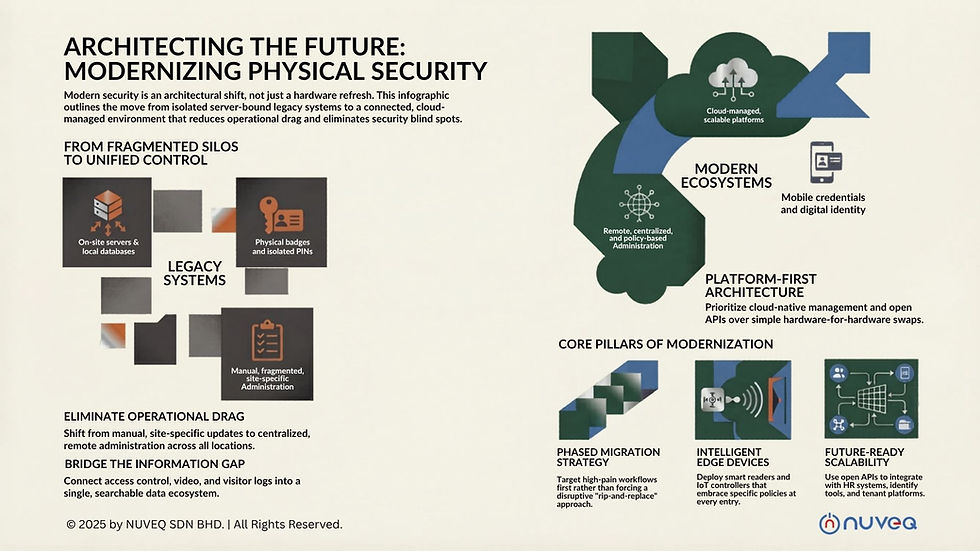
An open, cloud-based ecosystem also supports phased modernization. That is critical for organizations replacing legacy infrastructure in active environments where a full rip-and-replace project is unrealistic.
Common failure points to avoid
Many enterprise projects underperform for reasons that have little to do with readers, controllers, or door hardware. The issues usually sit in planning and architecture.
One common problem is over-customizing around current exceptions. If the system is built to mirror every legacy workaround, it becomes harder to manage and harder to scale. Another is treating access control as a local facilities purchase when it actually affects IT, compliance, HR, and executive risk exposure. Enterprise systems need cross-functional input early.
A third issue is underestimating remote administration. If your team still has to dispatch people for routine changes, diagnostics, or software maintenance, the operating model is not optimized. Remote capability is not just a convenience. It is a cost, uptime, and service-level issue.
There is also the temptation to focus too narrowly on upfront cost. Lower-cost systems can become more expensive once server maintenance, fragmented support, manual credentialing, and future integration limits are factored in. Enterprise buyers should evaluate total operating impact, not just procurement price.
What a future-ready system should deliver
A strong enterprise platform should make your environment easier to secure as it grows. That means centralized management across multiple sites, granular roles and permissions, mobile and physical credential support, real-time alerts, detailed reporting, and remote diagnostics from a single interface.
It should also support the broader reality of physical security today. Buildings are not isolated assets. They are connected environments with visitors, deliveries, vehicles, temporary workers, and compliance obligations moving through them constantly. Access control needs to function as part of that ecosystem.
For many organizations, the real upgrade is not replacing a card reader. It is replacing a fragmented operating model with a unified one. A cloud-native platform such as the type NUVEQ brings to market can reduce infrastructure burden while giving security and operations teams stronger control over identity, access, and site activity across the portfolio.
How to evaluate your next move
If you are planning an upgrade, start by mapping your friction points. Identify where credentials are delayed, where visibility is limited, where manual processes still dominate, and where local infrastructure is creating support overhead. Those pain points usually point to the architecture decisions that matter most.
Then look at growth. Ask whether the system can support new sites, new credential types, new integrations, and new security policies without major rework. A platform that fits today but resists change will become tomorrow's legacy problem.
Finally, consider the user groups involved. Security wants control and auditability. IT wants fewer servers and fewer support demands. Facilities wants reliability. Executives want risk reduction and operational efficiency. The best enterprise systems do not force those priorities into competition. They align them.
The most useful enterprise access control guide is the one that helps you choose a system you will not outgrow just as your security requirements become more complex. When access control is designed as a centralized, cloud-based, integrated layer of your operation, it stops being a patchwork of doors and starts becoming a measurable business advantage.


Comments